Christmas Gifts for Dad

Christmas gifts for dad.

It’s not easy to find Christmas gifts for Dad. Don’t dads tend to get whatever they need when they need it? Therefore, we have to work a little harder for Dad gifts. Here are a few we found:

  • Hey Dude Shoes. Dads love their Hey Dudes! Even young people love their Hey Dudes! I know guys who swear these are the most comfortable, easy-to-wear shoes they have ever owned…guys who go to college with my daughter, so they’re cool…not just Dad-cool. These are popular shoes for a reason. Right now, Hey Dude has some great deals on Amazon for Early Black Friday! Take advantage of the deals now:

    • Sunapee Mesh Sport, starting at $27.46 here.
    • Mens Wally Stretch Poly, starting at $45 here.
    • Mens Wally Sport Mesh, starting at $38.47 here.
    • Mens Wally Amazon Exclusive, starting at $38.99 here.
    • Mens Wally Sport Sneaker, starting at $41.43 here.

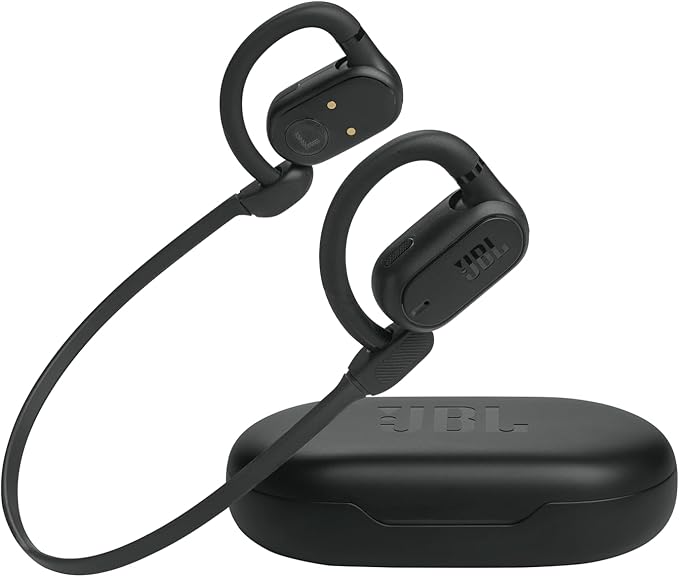
  • JBL Earbuds. I have mentioned these in other lists. There are all kinds of JBL wireless earbuds. I prefer the JBL Vibe Bud (Amazon deal here) or JBL Vibe Beam (Amazon deal here), but Dad might prefer the JBL Soundgear Sense, a true open-ear wireless headphone. Lucky you, they’re on sale for an Early Black Friday Deal (33% off!) here.
  • Smokeless Firepit. We have a smokeless firepit, and we love it. We use the Duraflame log in ours, for ease of use, and it provides plenty of warmth and light when we have cocktails on the patio. A 19″ Surestove smokeless firepit is on sale right now through Amazon for 41% off! That means the price is just $94.99 (normally $159.99) at writing, which is almost unheard of. Get it before it’s gone here. And while you’re at it, get him a bunch of Duraflame logs to burn in it here.

  • Amazon Fire TV. I purchased an Amazon Fire TV, because we can take it outside if we want, or we can use it in any room of the house. As long as it connects to WiFi, we can watch it. We have watched countless football games, Netflix shows, and Apple+ series. We treat it as a “portable” TV, because it’s lightweight, but with a 32″ screen, it has a clear picture. Our daughter has one in her bedroom at college and loves it too. Dad might enjoy having his own “portable” TV. Best of all? The price right now, as an Early Black Friday Deal, is $99.99! Get it here.

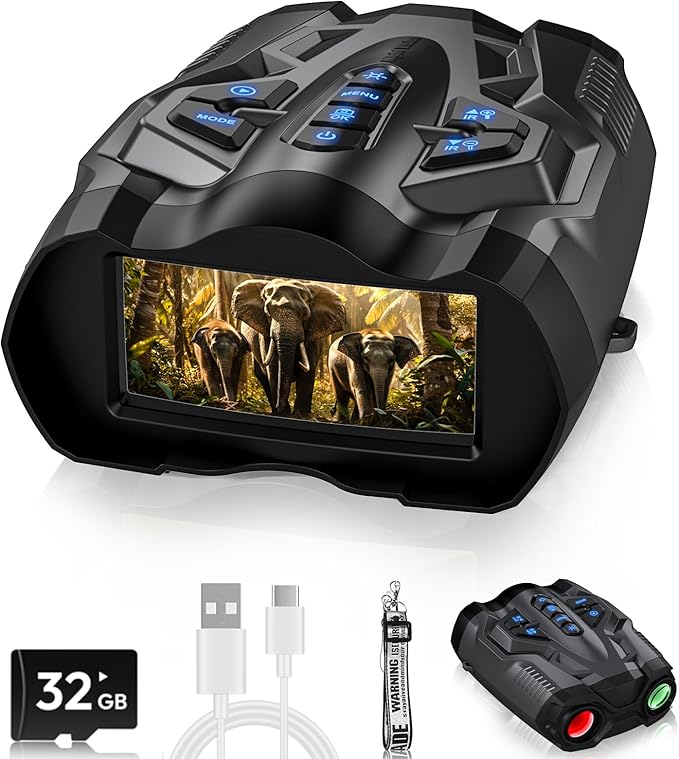
  • Night Vision Goggles. Men love outdoor toys. They can use these 4K goggles when they go hunting, or they can just use them when they hear something in the yard at night! What a fun gift! Get this Early Black Friday Deal here.
  • Comfier Hot Towel Warmer. Wow. I think my husband would love this. Who wouldn’t love grabbing a warm towel as you step out of the shower?!? Sign me up! Get this special Early Black Friday deal at 42% off for $114.99 here.

  • Bird Feeder with Camera. My dad would have loved this. The older he got, the more he enjoyed watching the wildlife. He could have watched the birds from indoors or anywhere with this bird feeder with camera! Instead of costing $199.99, it’s on sale now for $129.99! It’s the perfect time to purchase! Get it here.

  • Ugg Men’s Tasman Slipper. A perennial favorite, these slippers are awesome and well-made by Ugg. You can’t go wrong with Ugg slippers. Get them here.

  • Samsonite Expandable 20-inch Carry-on. Think Dad needs a new carry-on bag? This Samsonite gets great reviews and is perfect for dad. Get this Early Black Friday Deal here.

  • Tumi Oxblood Men’s Search Backpack. Tumi makes quality products. I have a Tumi crossbody bag I purchased eight years ago that I carry almost daily, and it still looks and functions great. My husband desperately needs a new carry-on backpack for his laptop and a few other items, and I think this one from Tumi will be perfect for him. It’s 25% off at time of writing. It’s pricey, but it’s built to last. Check it out here.

Happy Shopping for Dad!

***I receive commission for items purchased through my Amazon links.***

It’s Official…I’m Not Tech Savvy

It’s official. I’m not tech savvy.

I went to college at a time when it was OK to not be tech savvy. I knew how to type. I knew how to use a Mac for journalism, since that was my major. I didn’t take a programming class, because I took Spanish…I loved learning a new language. I didn’t learn how to make a spreadsheet or how to use Microsoft Word. I don’t even know if all that existed then. I knew how to do what I knew how to do, and that was fine. It was the 1980s.

Right out of college, I took a job as a flight attendant. All I needed to know how to do on the computer was sign in for trips and sign out when I was done. Easy peasy! I didn’t need to know more! I later worked in the travel industry, planning trips and meetings, but there was a certain computer system we used for that. I knew what I knew, and it worked for me. I was a pen and ink girl for a lot of things, because I found that I remembered things when I wrote them down. I still take constant notes when I’m in a meeting or on the phone, because that’s how my memory works…write it down, and I’ll remember it. My memory rarely fails me. Four hundred people attending a meeting? I have immediate recall if I write the names down before typing them into the computer. When they arrived and told me their names, I knew if they were registered or not…immediate recall. If someone couldn’t find someone’s name in registration, they would come to me, and when I heard the name, I would know if they had actually registered or not…immediate recall.

And then, technology moved a lot faster than I did. I can use a computer. I can launch a simple website using WordPress. I have always been able to do most of the things I needed to do, or I knew who to ask.  I have a dear friend who is a librarian, and she has taught me a lot. Sometimes, when I knew it would take time for her to teach me how to do things, I simply asked her to do them for me, and being the awesome friend she is, she did them. But I should do better.

One thing I learned during this pandemic is that I need to get up to speed on technology.

With the pandemic, everything has become “virtual.” That means I had to learn how to join Zoom meetings and Google Meet. Seriously, I had never done that before, but now I get it! I haven’t set one up yet, but I’m going to figure that out too. I might even try that today, just so I know how when I need it.

This year, I became a member of the board of a club at our daughter’s school that produces and presents a big awards show at the end of the year, and I signed on to chair that event. Fortunately, the people who have chaired it for the past six years were still on board, and I would treat this year as an apprenticeship, because I learned that I have a lot to learn…about the event, the process, and about technology.

I like to think I “learned on the job” this year. I can usually open an app and figure it out. I’m not completely inept. And I’ve worked with the Word app before, but this year, I was given a Word template to use for the awards show, and it threw me for a loop! It was something that was to be top secret, and only my eyes could see the finished product, so I had to figure it out. Word is a pretty simple app, right? Well, I sat down to work with the template, which I had been warned was a little tricky, but I thought, “I’ve got this!” No, I didn’t. Every time I would try to replace script within the template, it became skewed, or it wouldn’t do anything at all! I would click where I wanted to type…nothing.

After struggling with the template, I called my librarian friend to ask her what I’m doing wrong. After telling her what was happening, she said, “I think you have a different version of Word on your laptop, and maybe you need the latest one.” I couldn’t get my computer to download the latest version of Word, because well, my laptop is on my husband’s ID, and I don’t know the password. He was out of town, so I called him…he doesn’t know it either. I think it’s time for me to get my own laptop. That was the first thing I learned.

I struggled. I stressed. I didn’t know what I was doing, but I refused to admit defeat. I refused to admit to the other committee members that I didn’t have a clue. I had a few days to figure it out at that point, so I put it aside and went to bed.

At about 1:30am, I woke up and had a thought, “Maybe I can download the latest version on my phone and make it work?” I downloaded the latest version of Word to my phone, and lo and behold…within two minutes, I had everything on the template changed. I slept peacefully after that. I had found a solution to my problem, and I even felt a little…dare I say… savvy!

In reality, I know I’m not savvy. When other people send me documents to peruse or edit, it still scares me. I’m terrified I will mess it up beyond repair. I tend to think of the old Los Angeles Dodgers second baseman, Steve Sax, in the 1983 season. I remember hearing someone say about him, because he was the error king, “He has messed up second base so badly, nobody will  ever be able to play it!”  (In all fairness, I should tell you Sax eventually overcame his case of the “yips” and had a full career in Major League Baseball…and he was easy on the eyes. You can see an old picture of him on TMZ here.)  I suppose I need to take my own advice that I often give our daughter. She enjoys sports, and I always tell her that if she believes she can do something…if she can visualize herself doing something in a game…she can do it. Sometimes, confidence will pull us through. My brother goes into things knowing he can do them. He’s not cocky. He’s just confident. I need to approach technology with the same confidence.

So if I’ve learned anything during this pandemic, it’s that I have a lot to learn. I have set a goal to learn as much as I can over the summer about different useful apps…so I won’t be afraid of them anymore. I’m going to learn how to create slides and videos and fancy, complicated spreadsheets. Sure, I might have to ask my teenage daughter to tutor me along the way, but that’s OK.

I also know I owe my librarian friend dinner and a cocktail for all the whining she has listened to!

Bring on the technology!